
Bates numbering is one of those small details that becomes very important once a case involves hundreds of pages. It gives each page a clear reference number. Scanning puts paper records into digital form, while OCR (optical character recognition) lets you search the words inside those scans. Together, they make large document sets much easier to work with.
But the documents also have to match the rules that apply to the case. Federal and Texas discovery rules, court orders, and privacy requirements can all affect how a production is put together. This guide walks through those rules, then covers the everyday steps that help keep records readable, searchable, and organized.
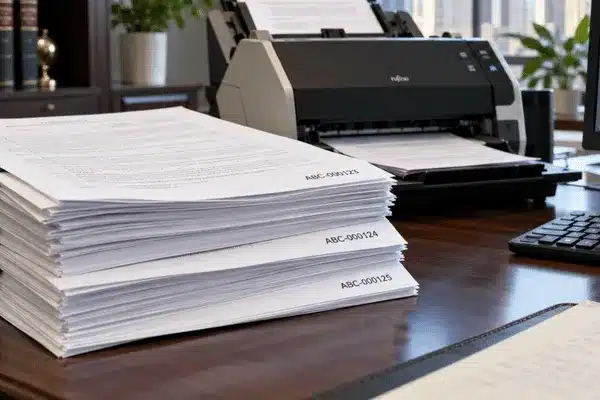
Bates numbering gives every page or file its own ID. You might see a number such as ABC-000123 in the lower corner of a produced document.
The name comes from the Bates Automatic Numbering-Machine. Inventor Edwin G. Bates patented an improved numbering mechanism in 1892 that changed the number automatically, and office workers used the device to stamp consecutive numbers onto document pages. Today, the number can be applied electronically. A 2025 federal court order, for example, calls for the Bates number to be electronically “burned” onto each produced page image or PDF page.
That number gives everyone a shared reference. An attorney can say, “Look at ABC-000123,” and the rest of the team knows exactly which page to open.
Bates numbers can appear in different ways, depending on the file type:
For a small document set, this may seem simple. For a large case, it can prevent a lot of confusion later.

Not every production needs Bates numbers.
Federal Rule of Civil Procedure 34 lets a requesting party state how electronic data should be produced. If no format is named, the data must be produced as it is normally kept or in a reasonably usable form.
The responding party can object to a requested form. If it does, or if the request names no form, it must state the form or forms it intends to use. Unless the parties agree or the court orders otherwise, the same electronically stored information does not have to be produced in more than one form.
The rule itself does not say Bates numbering is required. It does require documents to be produced as they are kept in the usual course of business or organized and labeled to match the categories in the request.
Texas Rule of Civil Procedure 196.4 also covers electronic data. It requires the requesting party to state the form it wants.
The responding party must then produce responsive data that is reasonably available to it in the ordinary course of business. If it cannot retrieve the data or produce it in the requested form through reasonable efforts, it must object. If the court orders compliance anyway, the court must also order the requesting party to pay the reasonable expenses of any extraordinary steps needed to retrieve and produce the information.
The Supreme Court of Texas addressed the issue in 2017 in In re State Farm Lloyds, 520 S.W.3d 595. The court said neither side gets to decide the format of electronic production on its own. It also pointed to proportionality as the “polestar” for working through disputes over production format.
Texas Rule 196.3 adds two practical points. A party may produce copies instead of originals unless the authenticity of the original is questioned or producing copies would be unfair. Documents must also be produced as they are kept in the usual course of business or organized and labeled to match the request. Like the federal rule, these Texas rules do not mention Bates numbering.
Some courts spell out Bates requirements in much more detail. In April 2025, for example, the federal court handling the GLP-1 receptor agonist MDL (No. 3094) in the Eastern District of Pennsylvania entered Case Management Order No. 26 for plaintiffs’ productions. The order calls for a clear, unique Bates number on every produced page, positioned so it does not cover information in the original. Native files are named using the next Bates number in sequence.
That is why the case documents should be checked before any stamping begins.
A scan is an image. OCR turns the words in that image into searchable text.
| Scanning | Copies a paper page into digital form | Image file |
| OCR | Reads text from a scanned image | Searchable text |
| Text extraction | Pulls text from a digital file | Machine-readable text |
A scanned PDF may look fine when you open it, but that does not mean you can search it. If there is no text layer, a search for a name or date may return nothing.
OCR fixes that by reading the words on the page.
Born-digital files are different because many already contain usable text. The Electronic Discovery Reference Model (EDRM) treats OCR text and extracted text as separate outputs for this reason. Its production and imaging guide calls for an extracted text file for each searchable native file and a multi-page OCR text file for each non-searchable file that contains text.
Image quality matters when firms OCR legal documents. Faint print, tilted pages, or poor scans can lead to missed words and bad search results.
Searchability can also become a legal issue. The federal advisory committee notes to Rule 34 state that when a party ordinarily keeps information in an electronically searchable form, it should not produce that information in a form that removes or significantly degrades that feature.
Texas has its own requirement for court filings. Under Texas Rule of Civil Procedure 21(f)(8), an electronically filed document must be in text-searchable PDF format, must be converted directly to PDF rather than scanned if possible, and must not be locked.
There is no single format that fits every production.
| Searchable PDF | Medical files, letters, and paper records |
| TIFF with text and load files | Large e-discovery productions |
| Native files | Spreadsheets and files where formulas matter |
Searchable PDF is practical for many paper records because they are easy to open and search.
TIFF is common in larger productions that use review software. Native files are often better for spreadsheets because formulas and other data may be lost when the file is turned into a flat image.
Redacted documents are a common exception to native production, since a redacted file cannot be produced exactly as it was kept.
The format should follow the ESI (electronically stored information) protocol or court order.
6 Essential Steps for Accurate Legal Document Production
Review discovery requests, ESI protocols, protective orders, and court requirements.
Work from copies whenever possible to preserve original documents and data.
Keep related documents together and verify page order before processing.
Create readable scans and make image-only documents searchable when required.
Securely remove protected information and apply consistent Bates numbers.
Verify readability, searchability, numbering, redactions, and page sequence.
IMPORTANT: Follow case-specific scanning standards, including 300 DPI and approved PDF or TIFF formats where required.
Document prep tends to go wrong when people are rushing. A straightforward process can keep small mistakes from turning into bigger problems later.
A 2025 federal MDL order required 300 DPI scans for certain hard-copy records. The same order also allowed searchable PDFs or approved TIFF productions.
When the paper volume is large, legal document scanning services can take care of scanning, OCR, Bates stamping, sorting, and quality checks.
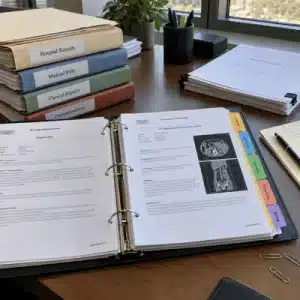
Medical records often come in from several places. One case may include hospital records, clinic notes, pharmacy files, and insurance documents.
Medical records can become relevant very early in a Texas injury case. Under Texas Rule of Civil Procedure 194.2(b)(10), a party claiming physical or mental injury must include, with its initial disclosures, medical records and bills reasonably tied to the injuries or damages being claimed. The party can provide an authorization instead. Those initial disclosures are generally due 30 days after the first answer or general appearance is filed, unless the parties agree to another date or the court sets one.
Without a clear naming system, those files can get messy fast. Bates ranges make it easier to see where one provider’s records stop and another set begins.
Privacy rules also matter. HHS allows HIPAA-covered entities to release protected health information in certain legal proceedings when Privacy Rule requirements are met. A valid patient authorization may also allow release in some situations.
Substance use disorder records can have added protections under 42 C.F.R. Part 2. Compliance with the updated rule became required on February 16, 2026.
Law firms also need to be careful with AI tools. ABA Formal Opinion 512 tells lawyers to think about confidentiality before placing client information into a generative AI system.
The same document organization helps once the case reaches court. A trial notebook can group exhibits by tab and Bates range, so everyone can turn to the right page without wasting time.
Central Texas Litigation Support Services provides records retrieval, scanning, OCR, Bates stamping, legal copying, and trial notebook preparation.
A Bates number often uses letters followed by a fixed set of numbers, such as ABC-0000451. The letters may stand for a party, client, or document group. The numbers then continue in order as more pages are added. Some court orders set their own rules for the prefix or number length.
Yes. A Bates number does not always have to be printed on the face of a document. For native files, the number may appear in the file name or the review database. Some productions also include a placeholder page that identifies the native file.
No. A Bates number only helps people keep track of a document during a case. It does not show who created the document or prove that the contents are accurate. Questions about authenticity are handled separately under rules such as Federal Rule of Evidence 901.
Always check the case requirements first. A 2025 Eastern District of Pennsylvania MDL order required 300 DPI for certain hard-copy records. Clear scans make small print, notes, and signatures easier to read. They also give OCR a better chance of reading the page correctly.
OCR makes it easier to search scanned records for names, dates, and key terms. This can save time when lawyers are putting together exhibits or getting ready for witness questioning. Still, important details should be checked against the original scan since OCR can sometimes misread text.
Outside help makes sense when there is a lot of paper, a short deadline, or fragile records to handle. A provider can scan, run OCR, apply Bates numbers, organize files, and check the final set. A legal copy service can also prepare exhibit sheets, tabs, copies, and trial notebooks. This can take a large amount of document work off the firm’s staff.
A good production does not need to be complicated. The important part is keeping the records readable, searchable, and easy to track from discovery through trial. Central Texas Litigation Support Services can help with scanning, OCR, Bates numbering, legal copies, and trial preparation. Get a quote today to discuss your next document project.